
Ok, ok, so I'm not really revealing anything that's really considered a secret. My life won't be in any danger after I've disclosed this great time-saving information... but, if it's not a secret, how come I'm always being asked "Hey! How did you do that!"?
Shortcuts:
How to Identify a Shortcut
If it saves you time, it's a shortcut.
Shortcuts usually begin with either the CONTROL or ALT keys and may sometimes include the SHIFT key. Usually CONTROL shortcuts are single commands while ALT shortcuts are a chain of menu options.
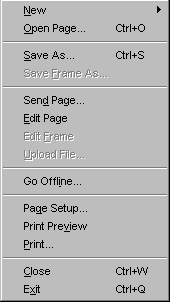 You can find most Shortcuts listed in the application's menu bar. Just look for "CTRL+" OR any letter in the menu bar that is underlined.
The underlined letters work in conjunction with the ALT key. In order to open the File Menubar, just press ALT-F. Then you can either press the letter of another underlined letter or use the arrow keys to go down.
| Close application | ALT-F4 |
| Close document/file | CTRL-F4 |
| Next application | ALT-TAB |
| Next document/file | CTRL-TAB |
| Previous document/file | CTRL-SHIFT-TAB |
| CTRL-P | |
| Save file | CTRL-S |
| Open file | CTRL-O |
| New file/Browser window | CTRL-N |
| Select All | CTRL-A |
| Copy | CTRL-C |
| Paste | CTRL-V |
| Undo | CTRL-Z |
| Bold | CTRL-B |
| Italicize | CTRL-I |
| Underline | CTRL-U |
| Back (browser) | ALT-Left Arrow |
| Forward (browser) | ALT-Right Arrow |
| Help | F1 |
| View Properties of selected item | ALT-ENTER |
| Access 'Start Menu' | CTRL-ESC |
| Beginning of document | CTRL-HOME |
| End of document | CTRL-END |
| Toggle maximize/normal window size | Double-click
empty space on menubar |

|
Please notify me of any broken links and I'll immediately and gladly correct them. Email your questions, ideas, review requests and comments to .
Copyright 1997-2026, YouthPastor.com. All Rights Reserved
http://www.youthpastor.com/2000/index.cfm/A/Shortcut.htm
Reproduction allowed for personal use only. More info at:
http://www.youthpastor.com/about/index.cfm/fuseaction/legal.htm